
- by x32x01 ||
Managing Git repositories doesn't have to mean switching between your terminal, code editor, Git client, and AI assistant all day.
GitTree is a graphical Git client for macOS, Windows, and Linux that brings repository management and AI-owered assistance into one desktop application.
Built with Rust, Tauri, and React, GitTree runs locally on your computer and includes an integrated AI assistant called Nour. Rather than requiring a separate AI subscription or asking for another API key, Nour works with AI coding tools you already use.
Here's what GitTree offers, how its AI integration works, and what makes it worth exploring.
It combines a visual Git interface with repository management, integrated development tools, and an AI assistant capable of understanding and interacting with your project.
The application supports:
Unlike applications that require users to configure a separate AI model or provide an additional API key, Nour connects to AI coding tools already available in your development environment.
Supported integrations described by the project include:
1. Explain commits and branch changes
Instead of manually inspecting every change, you can ask Nour to explain your latest commit or summarize how your current branch differs from the main branch.
This can be particularly useful when returning to a project after several days or reviewing unfamiliar changes.
2. Review changes before committing
Nour can inspect your modifications before you create a commit and identify potentially risky changes.
AI-generated reviews should still be treated as additional assistance, not a replacement for testing, security checks, or human code review.
3. Generate commit messages and Pull Request descriptions
Writing meaningful commit messages becomes easier when the assistant can inspect the changes you're preparing to submit.
Nour can also help draft Pull Request descriptions, reducing the time spent documenting routine development work.
4. Control GitTree through MCP
Nour integrates with GitTree through the Model Context Protocol (MCP), allowing the assistant to interact with application functionality rather than being limited to text responses.
Its permission-based system distinguishes between different types of operations:
For example, if you're trying to understand an unfamiliar commit, Ask Mode is the natural starting point.
If you want the assistant to carry out an operation inside GitTree, Agent Mode provides that functionality.
GitTree addresses this through its snapshot and undo functionality.
According to the project description, Nour creates a snapshot of your work before executing each step. You can then undo an entire AI turn with a single action.
This makes experimenting with AI-assisted Git operations more manageable.
However, snapshots should not be treated as a complete replacement for backups. Developers should still maintain proper version control practices and keep important work protected.
Here are some of its other notable features.
The application is designed to handle large repositories, making it useful for projects with extensive commit histories.
GitTree includes visual tools for interactive rebase and conflict resolution, reducing the need to manage every operation through terminal commands.
According to its published project description, the application includes the following privacy-related characteristics:
When using external AI coding tools, their own configurations, data-handling practices, and network requirements still apply.
Developers working with confidential repositories should review those settings before enabling AI assistance.
To get started:
Check the official website for the latest releases, platform requirements, and installation instructions.
What makes it particularly interesting is Nour's approach to AI integration: using existing coding tools, applying operation-level permissions, and providing snapshots with turn-level undo functionality.
For developers who want visual Git management alongside AI-assisted workflows, GitTree is worth exploring.
Download GitTree: https://gittree.app/
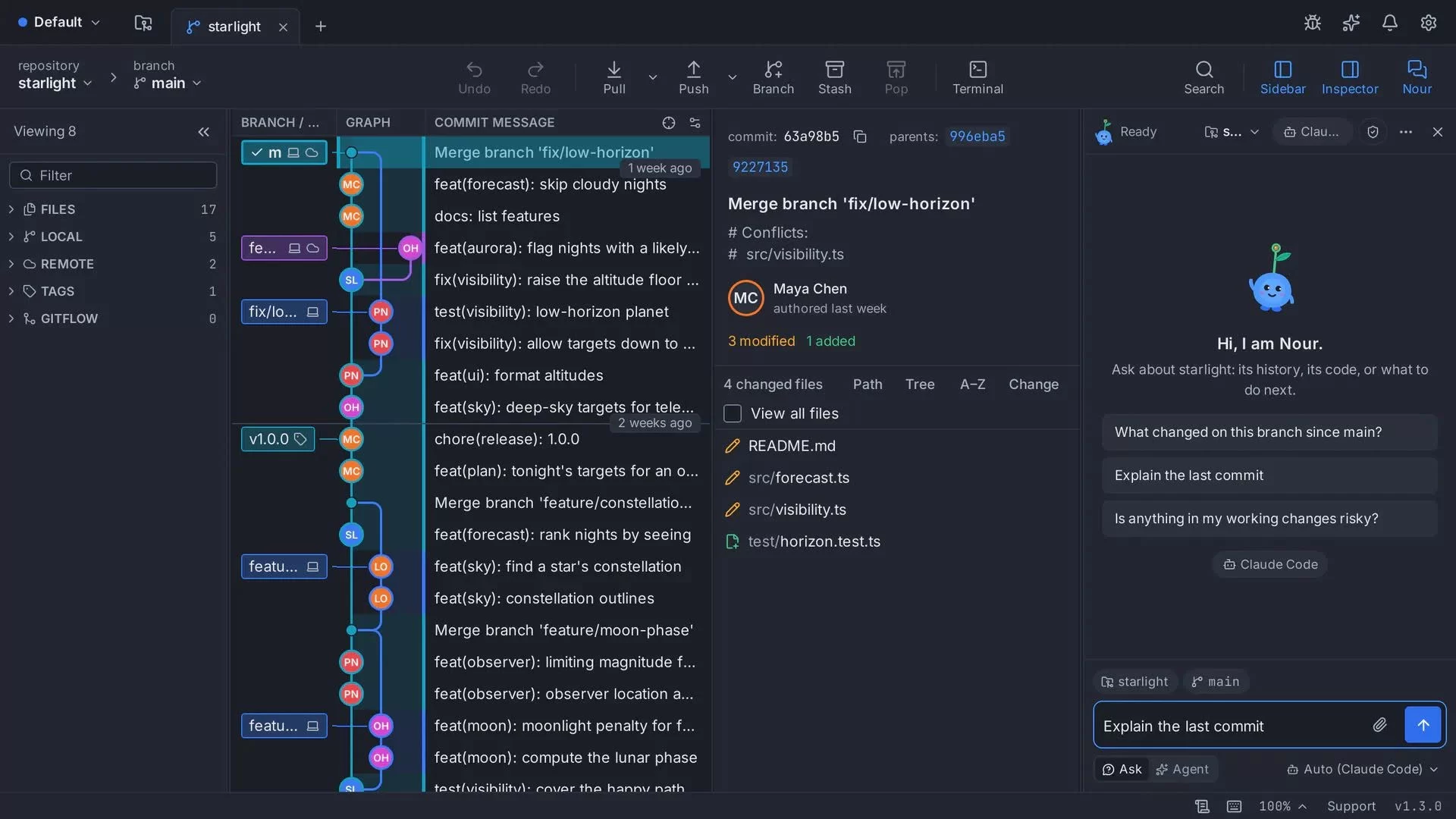
GitTree is a graphical Git client for macOS, Windows, and Linux that brings repository management and AI-owered assistance into one desktop application.
Built with Rust, Tauri, and React, GitTree runs locally on your computer and includes an integrated AI assistant called Nour. Rather than requiring a separate AI subscription or asking for another API key, Nour works with AI coding tools you already use.
Here's what GitTree offers, how its AI integration works, and what makes it worth exploring.
🌳 What Is GitTree?
GitTree is a cross-platform Git GUI designed to simplify everyday version control tasks while keeping advanced Git functionality accessible.It combines a visual Git interface with repository management, integrated development tools, and an AI assistant capable of understanding and interacting with your project.
The application supports:
- Windows, macOS, and Linux.
- Fast commit graph visualization, including for large repositories.
- Visual staging and diff inspection.
- Interactive rebase and conflict resolution.
- An integrated terminal and command palette.
- Pull Request management.
- GitHub, GitLab, Bitbucket, and Azure DevOps account integration.
- English and Arabic interfaces.
✨ Meet Nour: GitTree's Built-In AI Assistant
One of GitTree's most interesting features is Nour, an integrated AI assistant that works directly inside your repository.Unlike applications that require users to configure a separate AI model or provide an additional API key, Nour connects to AI coding tools already available in your development environment.
Supported integrations described by the project include:
- Claude Code
- OpenAI Codex
- Gemini CLI
- Antigravity
- Other compatible AI tools
What Can Nour Actually Do?
Nour is designed to help with practical Git operations rather than simply answering general programming questions.1. Explain commits and branch changes
Instead of manually inspecting every change, you can ask Nour to explain your latest commit or summarize how your current branch differs from the main branch.
This can be particularly useful when returning to a project after several days or reviewing unfamiliar changes.
2. Review changes before committing
Nour can inspect your modifications before you create a commit and identify potentially risky changes.
AI-generated reviews should still be treated as additional assistance, not a replacement for testing, security checks, or human code review.
3. Generate commit messages and Pull Request descriptions
Writing meaningful commit messages becomes easier when the assistant can inspect the changes you're preparing to submit.
Nour can also help draft Pull Request descriptions, reducing the time spent documenting routine development work.
4. Control GitTree through MCP
Nour integrates with GitTree through the Model Context Protocol (MCP), allowing the assistant to interact with application functionality rather than being limited to text responses.
Its permission-based system distinguishes between different types of operations:
- Safe operations: Can execute automatically.
- Sensitive operations: Require user approval.
- Prohibited operations: Are blocked entirely.
🤖 Ask Mode vs. Agent Mode
GitTree provides two interaction modes for Nour, depending on whether you want information or want the assistant to perform an action.| Mode | Purpose |
|---|---|
| Ask Mode | Ask questions, understand commits, and explore repository changes. |
| Agent Mode | Allow Nour to perform supported actions within its permission boundaries. |
If you want the assistant to carry out an operation inside GitTree, Agent Mode provides that functionality.
🛡️ AI Snapshots and Undo: A Safety Feature Worth Knowing
Giving an AI assistant permission to perform repository operations introduces an important concern: what happens when an action produces an unwanted result?GitTree addresses this through its snapshot and undo functionality.
According to the project description, Nour creates a snapshot of your work before executing each step. You can then undo an entire AI turn with a single action.
This makes experimenting with AI-assisted Git operations more manageable.
However, snapshots should not be treated as a complete replacement for backups. Developers should still maintain proper version control practices and keep important work protected.
GitTree Features Beyond AI
Although Nour is a major part of the experience, GitTree is also designed to function as a standalone Git client.Here are some of its other notable features.
Visual Git History and Commit Graph
GitTree provides a fast commit graph that helps developers understand repository history and branch relationships.The application is designed to handle large repositories, making it useful for projects with extensive commit histories.
Interactive Rebase and Conflict Resolution
Git operations can become difficult when branches diverge or multiple developers modify the same files.GitTree includes visual tools for interactive rebase and conflict resolution, reducing the need to manage every operation through terminal commands.
Integrated Development Tools
The application brings several frequently used development features into one interface:- File staging.
- Diff inspection.
- Integrated terminal.
- Command palette.
- Pull Request management.
🔐 Privacy and Local-First Design
GitTree emphasizes local operation and user privacy.According to its published project description, the application includes the following privacy-related characteristics:
- No telemetry or activity tracking.
- Local desktop operation.
- Secrets stored using the operating system's keychain.
- No mandatory login for core Git functionality.
- No requirement to provide GitTree with an additional AI API key.
When using external AI coding tools, their own configurations, data-handling practices, and network requirements still apply.
Developers working with confidential repositories should review those settings before enabling AI assistance.
How to Download GitTree
GitTree is currently offered as a free download through its official website.To get started:
- Visit the official GitTree website.
- Download the version compatible with your operating system.
- Install and launch the application.
- Open an existing Git repository.
- Explore the visual Git tools and configure a supported AI coding tool if you want to use Nour.
Check the official website for the latest releases, platform requirements, and installation instructions.
Who Should Try GitTree?
GitTree may be particularly useful for:- Developers who prefer visual Git tools: Manage repository history, staging, and conflicts through a graphical interface.
- AI-assisted developers: Connect existing coding assistants to repository workflows.
- Teams working with Pull Requests: Simplify change reviews and PR documentation.
- Developers managing complex repositories: Explore commit history and perform advanced Git operations visually.
- Privacy-conscious users: Use a local-first Git application without mandatory account registration.
Final Thoughts
GitTree combines a cross-platform graphical Git client with an integrated AI assistant that can explain repository changes, review modifications, generate commit messages, and interact with the application through MCP.What makes it particularly interesting is Nour's approach to AI integration: using existing coding tools, applying operation-level permissions, and providing snapshots with turn-level undo functionality.
For developers who want visual Git management alongside AI-assisted workflows, GitTree is worth exploring.
Download GitTree: https://gittree.app/
Last edited: