
- by x32x01 ||

If you’ve ever opened Wireshark and felt overwhelmed by the endless stream of packets flying by - you’re not alone 😅.
Filters are the secret weapon that turns chaos into clarity. With the right filters, you can instantly isolate issues, monitor traffic, and uncover hidden insights in your network.
Let’s break down the most powerful Wireshark filters you can use today 👇
Perfect for tracking communication between specific hosts or troubleshooting local networks.
Quickly filter only the protocol you need to study - great for performance analysis or malware traffic detection.
Helpful for detecting connection attempts, handshakes, or unstable links.
Useful for web debugging, DNS misconfigurations, or identifying suspicious domains.
Perfect for verifying SSL/TLS connections or SNI visibility during secure communication.
Quickly locate large transfers, authentication packets, or keyword-based payloads.
This gives your team deep insight into internal communication paths and potential bottlenecks.
Mastering them will make you faster, sharper, and far more effective as a network engineer or cybersecurity analyst 🚀.
✨ Filter smart, troubleshoot faster, and turn packet chaos into pure signal.
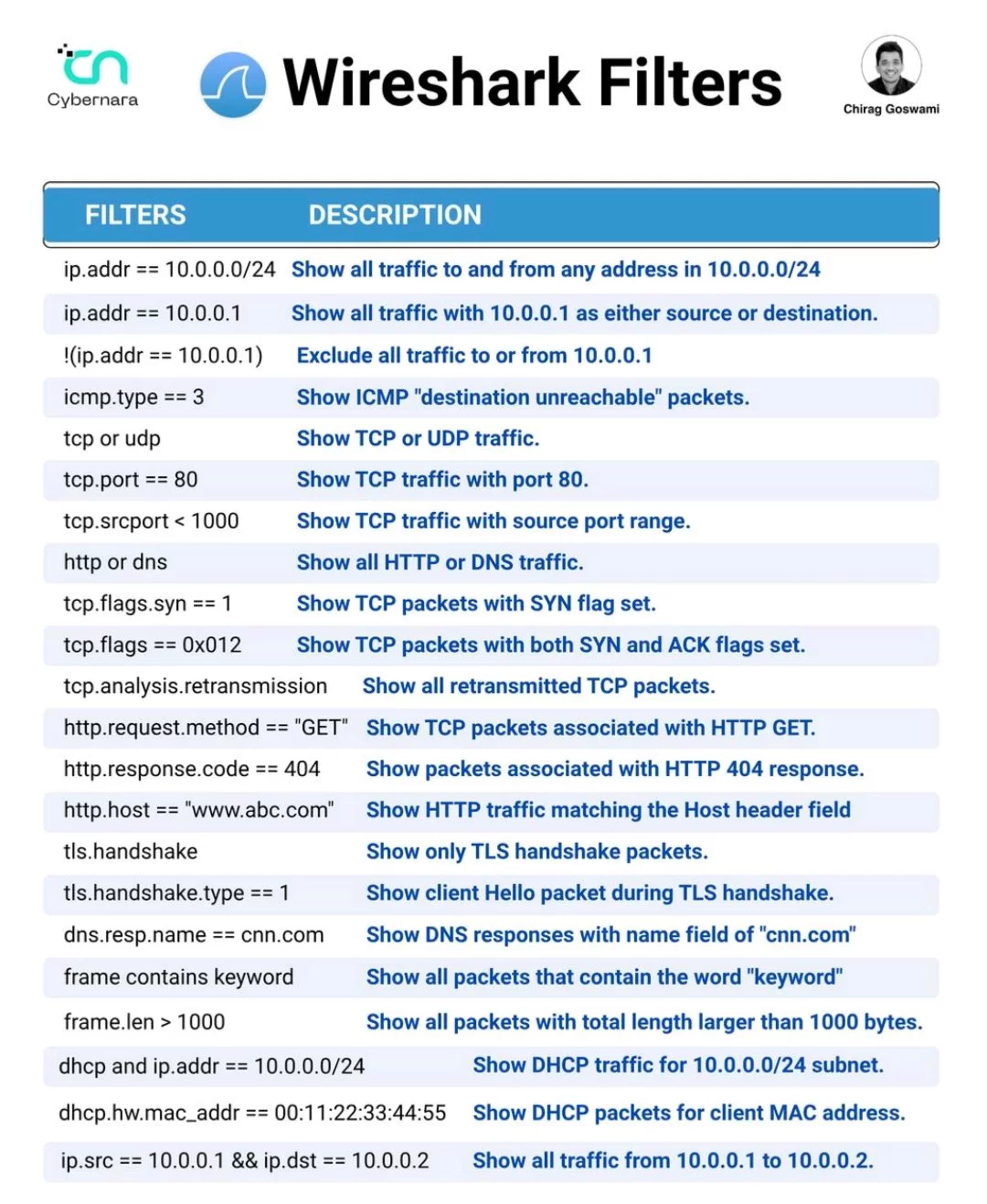
Filters are the secret weapon that turns chaos into clarity. With the right filters, you can instantly isolate issues, monitor traffic, and uncover hidden insights in your network.
Let’s break down the most powerful Wireshark filters you can use today 👇
🌐 IP Focus
🎯 Narrow down traffic by source, destination, or subnet: Code:
ip.addr == 192.168.1.10
ip.src == 10.0.0.5
ip.dst == 8.8.8.8
ip.addr == 192.168.1.0/24🔄 Protocol Filtering
🧩 Zero in on protocols like TCP, UDP, HTTP, DNS, or ICMP: Code:
tcp
udp
http
dns
icmp🚦 TCP Flags & Sessions
🕵️♂️ Isolate SYN, ACK, retransmissions, and session behavior: Code:
tcp.flags.syn == 1
tcp.flags.ack == 1
tcp.analysis.retransmission
tcp.stream eq 3🌍 Application Layer Filters
🍔 Focus on HTTP requests, DNS queries, and host headers: Code:
http.request.method == "GET"
http.response.code == 404
dns.qry.name == "example.com"
http.host contains "login"🔐 TLS Handshakes
🛡️ Analyze encryption handshakes and Client Hello packets: Code:
tls.handshake.type == 1
tls.handshake.extensions_server_name📦 Payload Patterns
🧮 Filter packets by keywords, length, or DHCP activity: Code:
frame.len > 1000
bootp
data contains "password"🗺️ Path Analysis
🧭 Visualize how hosts communicate across the network using Wireshark’s IO Graph and Flow Graph tools.This gives your team deep insight into internal communication paths and potential bottlenecks.
💡 Final Thoughts
When your team needs visibility at the packet level, filters are the line between noise and insight 🌐.Mastering them will make you faster, sharper, and far more effective as a network engineer or cybersecurity analyst 🚀.
✨ Filter smart, troubleshoot faster, and turn packet chaos into pure signal.