
- by x32x01 ||
Getting invited to a bug bounty platform sounds like a good opportunity for security researchers. But what happens when you discover serious security issues, submit your findings, and receive responses that don't seem to reflect their potential impact?
A security researcher recently shared a frustrating experience with HackProve, a bug bounty platform, after testing the NINEBOT program and reporting three separate vulnerabilities.
According to the researcher's account, the findings involved an XSS vulnerability with a potential account takeover impact, an exposed API affecting customer information and support conversations, and an authorization issue that reportedly provided administrative access to internal projects.
The controversy wasn't just about the rewards. It was about how the reported vulnerabilities were evaluated and whether their potential security impact received appropriate consideration.
Note: This article presents the researcher's account and explains the technical security concerns involved. The reported findings, platform responses, and reward details have not been independently verified.
🔍 The HackProve Bug Bounty Experience
According to the researcher, the experience began after receiving an invitation from HackProve to explore its available bug bounty programs.
Upon accessing the platform, the researcher found only three active programs, which they described as offering relatively modest rewards.
They decided to investigate one of the available targets: NINEBOT.
During testing, the researcher claims to have discovered three vulnerabilities affecting different areas of the application.
Here's what happened.
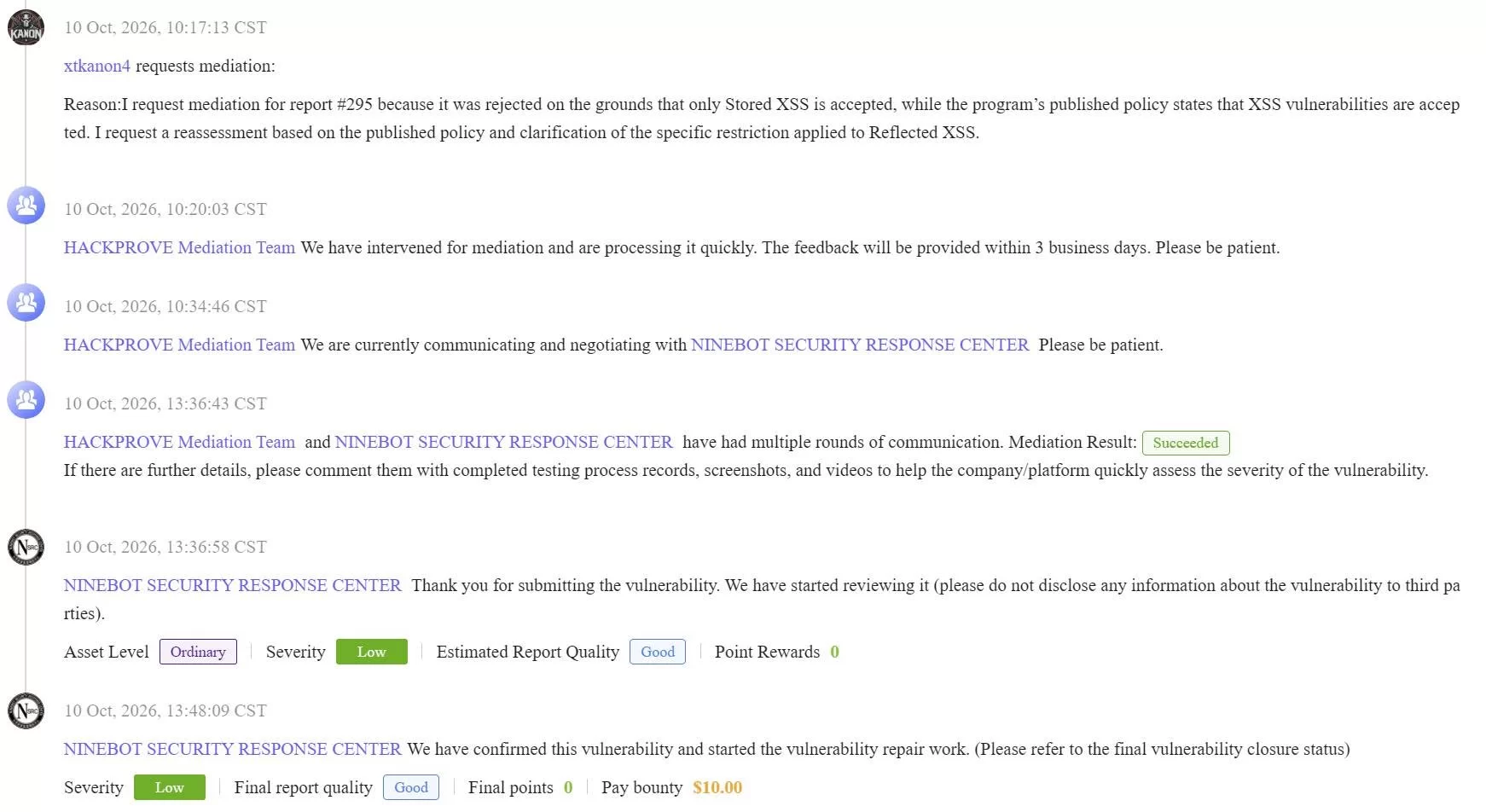
According to the researcher, the vulnerability could potentially lead to a full account takeover after a victim clicked a specially crafted link.
However, the initial report was reportedly rejected.
The reason?
The researcher says the program responded that it was currently accepting Stored XSS vulnerabilities only, despite its published policy also listing Reflected XSS as an accepted vulnerability type.
After disputing the decision, the researcher claims the finding was eventually accepted, classified as Low severity, and awarded $10.
The researcher also stated that the affected website was the company's main website.
For example:
A vulnerability that genuinely enables account takeover may warrant a significantly different assessment from one that only demonstrates limited JavaScript execution.
The actual severity depends on factors such as exploitability, required user interaction, authentication context, affected privileges, and demonstrated impact.
The important question is whether the reported account takeover was reproducible and supported by sufficient evidence.
If a program explicitly accepts Reflected XSS in its published policy, any later restriction should also be communicated clearly to participating researchers.
According to the researcher, the issue made it possible to:
The identifier format alone does not establish a vulnerability. The security concern would arise if the application allowed an unauthorized user to access or modify another customer's information simply by supplying a different identifier.
The researcher claims the platform responded to this report with:
"No actual harm."
BOLA occurs when an application exposes an object through an API but fails to verify whether the requesting user is authorized to access that specific object.
For example, a support system should not allow Customer A to retrieve Customer B's private conversation merely by changing a requester identifier.
The potential impact extends beyond information disclosure.
The ability to write messages within another customer's live support conversation would be particularly concerning if the action could be performed without proper authorization.
It could undermine the integrity of support communications and potentially enable further social engineering.
Security takeaway: API endpoints must enforce authorization checks on every request. An identifier should never be treated as proof that a user owns or can access the associated resource.
The researcher did not publicly disclose the specific header or provide a complete technical proof of concept in the shared account.
However, they claimed that the finding allowed access to internal projects as an administrator.
According to their account, the response was once again:
"No actual harm."
However, applications should never grant elevated privileges simply because a client supplies an untrusted header claiming a particular identity or role.
If administrative access can be obtained through unauthorized manipulation of request metadata, the underlying issue may involve broken access control or an authentication design flaw.
The actual severity would depend on what the researcher could access or modify, whether the privileges were genuine, and whether the behavior was reproducible.
Unauthorized administrative access to internal projects could potentially expose sensitive information or permit changes to protected resources.
A complete assessment would require evidence demonstrating the access level and its associated permissions.
Programs need to evaluate reproducibility, scope, exploitability, demonstrated impact, and their published reward policies.
At the same time, researchers need clear explanations when their reports are rejected or assigned a lower severity than expected.
Based on the researcher's account, the main disagreements can be summarized as follows:
These are the researcher's reported experiences, not independently confirmed findings or an official statement from HackProve.
There may be additional technical details, scope restrictions, or triage considerations that were not included in the original account.
Nevertheless, the situation highlights an important issue: a useful vulnerability assessment should explain why the demonstrated behavior does or does not qualify as a security impact.
1. Read the program policy before testing.
Check which vulnerability categories are accepted, which assets are in scope, and whether specific findings are excluded from rewards.
2. Save the published scope and policy.
If a program changes its acceptance criteria, having a record of the policy applicable when testing began can help resolve disagreements.
3. Demonstrate impact safely.
A finding supported by clear, reproducible evidence is easier to assess than one based on a theoretical exploitation scenario. Avoid accessing unnecessary customer data or making destructive changes.
4. Separate vulnerability type from business impact.
An XSS finding should not automatically be considered Low simply because it is reflected. Similarly, a BOLA finding should be assessed according to the actual unauthorized access demonstrated.
5. Request a technical explanation when disputing triage.
If a report is rejected or downgraded, ask which specific policy requirement, reproducibility issue, or impact assessment led to that decision.
6. Keep responsible disclosure in mind.
Avoid publicly releasing sensitive customer information, active exploitation details, or confidential internal project data. Follow the applicable disclosure agreement and allow an appropriate remediation process.
According to the shared account, three vulnerabilities were reported against the NINEBOT program, with the researcher expressing particular frustration over the handling of the XSS finding and the responses to the API and authorization issues.
Without the complete reports, reproduction evidence, and the platform's side of the discussion, it would be premature to conclude that every reported severity assessment was incorrect.
However, the broader lesson remains valuable.
A good bug bounty program needs more than a list of accepted vulnerability types. It needs consistent policies, meaningful technical feedback, and a fair assessment of demonstrated security impact.
For researchers, choosing programs with clear scope definitions, transparent triage processes, and a reliable disclosure workflow can make a significant difference in the overall hunting experience.
A security researcher recently shared a frustrating experience with HackProve, a bug bounty platform, after testing the NINEBOT program and reporting three separate vulnerabilities.
According to the researcher's account, the findings involved an XSS vulnerability with a potential account takeover impact, an exposed API affecting customer information and support conversations, and an authorization issue that reportedly provided administrative access to internal projects.
The controversy wasn't just about the rewards. It was about how the reported vulnerabilities were evaluated and whether their potential security impact received appropriate consideration.
Note: This article presents the researcher's account and explains the technical security concerns involved. The reported findings, platform responses, and reward details have not been independently verified.
🔍 The HackProve Bug Bounty Experience
According to the researcher, the experience began after receiving an invitation from HackProve to explore its available bug bounty programs.
Upon accessing the platform, the researcher found only three active programs, which they described as offering relatively modest rewards.
They decided to investigate one of the available targets: NINEBOT.
During testing, the researcher claims to have discovered three vulnerabilities affecting different areas of the application.
Here's what happened.
1. XSS Vulnerability With Potential Account Takeover
The first reported finding was a Cross-Site Scripting (XSS) vulnerability.According to the researcher, the vulnerability could potentially lead to a full account takeover after a victim clicked a specially crafted link.
However, the initial report was reportedly rejected.
The reason?
The researcher says the program responded that it was currently accepting Stored XSS vulnerabilities only, despite its published policy also listing Reflected XSS as an accepted vulnerability type.
After disputing the decision, the researcher claims the finding was eventually accepted, classified as Low severity, and awarded $10.
The researcher also stated that the affected website was the company's main website.
Why the XSS Classification Matters
Not every XSS vulnerability has the same security impact.For example:
- Reflected XSS generally requires a victim to interact with a crafted request or link.
- Stored XSS persists within the application and can affect users who access the compromised content.
- DOM-based XSS occurs when unsafe client-side JavaScript processes attacker-controlled data.
A vulnerability that genuinely enables account takeover may warrant a significantly different assessment from one that only demonstrates limited JavaScript execution.
The actual severity depends on factors such as exploitability, required user interaction, authentication context, affected privileges, and demonstrated impact.
The important question is whether the reported account takeover was reproducible and supported by sufficient evidence.
If a program explicitly accepts Reflected XSS in its published policy, any later restriction should also be communicated clearly to participating researchers.
2. Exposed API Allegedly Revealing Customer PII and Support Conversations
The second reported vulnerability involved an exposed API that allegedly allowed access to customer information and support conversations.According to the researcher, the issue made it possible to:
- Access customers' Personally Identifiable Information (PII).
- Retrieve complete conversations between customers and the support team.
- Send messages within an existing support conversation while impersonating the affected customer.
Requester1767570027461The identifier format alone does not establish a vulnerability. The security concern would arise if the application allowed an unauthorized user to access or modify another customer's information simply by supplying a different identifier.
The researcher claims the platform responded to this report with:
"No actual harm."
Why This Could Be a Serious Security Issue
If independently reproduced, the reported behavior could indicate a Broken Object Level Authorization (BOLA) vulnerability, commonly associated with Insecure Direct Object Reference (IDOR) issues.BOLA occurs when an application exposes an object through an API but fails to verify whether the requesting user is authorized to access that specific object.
For example, a support system should not allow Customer A to retrieve Customer B's private conversation merely by changing a requester identifier.
The potential impact extends beyond information disclosure.
| Reported behavior | Potential security impact |
|---|---|
| Accessing customer PII | Privacy and data exposure |
| Reading support conversations | Disclosure of confidential communications |
| Sending messages as another customer | Unauthorized actions and impersonation |
| Accessing records through another requester ID | Possible broken object-level authorization |
It could undermine the integrity of support communications and potentially enable further social engineering.
Security takeaway: API endpoints must enforce authorization checks on every request. An identifier should never be treated as proof that a user owns or can access the associated resource.
3. Reported Administrative Access to Internal Projects
The third finding reportedly involved an authorization issue that allowed the researcher to access internal projects with administrative privileges through manipulation of an HTTP request header.The researcher did not publicly disclose the specific header or provide a complete technical proof of concept in the shared account.
However, they claimed that the finding allowed access to internal projects as an administrator.
According to their account, the response was once again:
"No actual harm."
The Security Risk of Header-Based Authorization Issues
HTTP headers can legitimately carry authentication credentials, session information, and other request metadata.However, applications should never grant elevated privileges simply because a client supplies an untrusted header claiming a particular identity or role.
If administrative access can be obtained through unauthorized manipulation of request metadata, the underlying issue may involve broken access control or an authentication design flaw.
The actual severity would depend on what the researcher could access or modify, whether the privileges were genuine, and whether the behavior was reproducible.
Unauthorized administrative access to internal projects could potentially expose sensitive information or permit changes to protected resources.
A complete assessment would require evidence demonstrating the access level and its associated permissions.
⚖️ What This Experience Reveals About Bug Bounty Triage
Bug bounty triage is more complicated than simply deciding whether a vulnerability exists.Programs need to evaluate reproducibility, scope, exploitability, demonstrated impact, and their published reward policies.
At the same time, researchers need clear explanations when their reports are rejected or assigned a lower severity than expected.
Based on the researcher's account, the main disagreements can be summarized as follows:
| Reported vulnerability | Researcher's claimed impact | Reported response |
|---|---|---|
| XSS | Potential full account takeover | Initially rejected; later accepted as Low with a $10 reward |
| Exposed API | Customer PII disclosure and support conversation impersonation | "No actual harm" |
| Authorization issue | Administrative access to internal projects | "No actual harm" |
There may be additional technical details, scope restrictions, or triage considerations that were not included in the original account.
Nevertheless, the situation highlights an important issue: a useful vulnerability assessment should explain why the demonstrated behavior does or does not qualify as a security impact.
🛡️ What Bug Bounty Hunters Can Learn From This
Regardless of the platform involved, this experience offers several practical lessons for security researchers.1. Read the program policy before testing.
Check which vulnerability categories are accepted, which assets are in scope, and whether specific findings are excluded from rewards.
2. Save the published scope and policy.
If a program changes its acceptance criteria, having a record of the policy applicable when testing began can help resolve disagreements.
3. Demonstrate impact safely.
A finding supported by clear, reproducible evidence is easier to assess than one based on a theoretical exploitation scenario. Avoid accessing unnecessary customer data or making destructive changes.
4. Separate vulnerability type from business impact.
An XSS finding should not automatically be considered Low simply because it is reflected. Similarly, a BOLA finding should be assessed according to the actual unauthorized access demonstrated.
5. Request a technical explanation when disputing triage.
If a report is rejected or downgraded, ask which specific policy requirement, reproducibility issue, or impact assessment led to that decision.
6. Keep responsible disclosure in mind.
Avoid publicly releasing sensitive customer information, active exploitation details, or confidential internal project data. Follow the applicable disclosure agreement and allow an appropriate remediation process.
Final Thoughts
The researcher's HackProve experience raises questions about vulnerability triage, reward transparency, and communication between bug bounty platforms and security researchers.According to the shared account, three vulnerabilities were reported against the NINEBOT program, with the researcher expressing particular frustration over the handling of the XSS finding and the responses to the API and authorization issues.
Without the complete reports, reproduction evidence, and the platform's side of the discussion, it would be premature to conclude that every reported severity assessment was incorrect.
However, the broader lesson remains valuable.
A good bug bounty program needs more than a list of accepted vulnerability types. It needs consistent policies, meaningful technical feedback, and a fair assessment of demonstrated security impact.
For researchers, choosing programs with clear scope definitions, transparent triage processes, and a reliable disclosure workflow can make a significant difference in the overall hunting experience.
- by x32x01 ||
Since there's supposedly "no actual harm,"
here's the API endpoint exposing customer PII, in case anyone finds it useful.
https://dms-cc-us.segway-ninebot.co...oryMessages?customerId=Requester1767570027461
here's the API endpoint exposing customer PII, in case anyone finds it useful.
https://dms-cc-us.segway-ninebot.co...oryMessages?customerId=Requester1767570027461