
- by x32x01 ||
Have you ever added a new Gmail account to your Android phone and received a notification saying your phone number was verified, even though you never entered it manually?
This can happen because Google offers an automatic phone number verification feature on supported Android devices. It helps Google confirm the phone number associated with your device without requiring you to type it every time.
But how does this feature work? Does it automatically connect your phone number to your Google accounts? And can you disable it?
Here's what you should know and how to take control of the setting.
On supported devices, Google may use this feature to confirm your number and make it available for certain Google services, depending on your account and device settings.
This can make processes such as phone number verification and account setup more convenient.
Here's the important part: You may not always need to enter your phone number manually for Google to verify it.
However, this doesn't mean every new Gmail account automatically receives your phone number. The behavior depends on the device, available Google services, and applicable account settings.
Google can use supported verification methods to confirm that a phone number belongs to your device.
Depending on the verification process, this may involve exchanging information with your mobile carrier.
A few things are worth understanding:
Its presence alone doesn't indicate that your phone has been hacked or that someone has accessed your Gmail account.
However, your phone number is personal information, so understanding which Google services use it is important.
For example, you might prefer to keep your personal and work Google accounts separate or limit how your number is associated with different services.
The good news: Google provides settings that let you review and manage automatic phone number verification on supported Android devices.
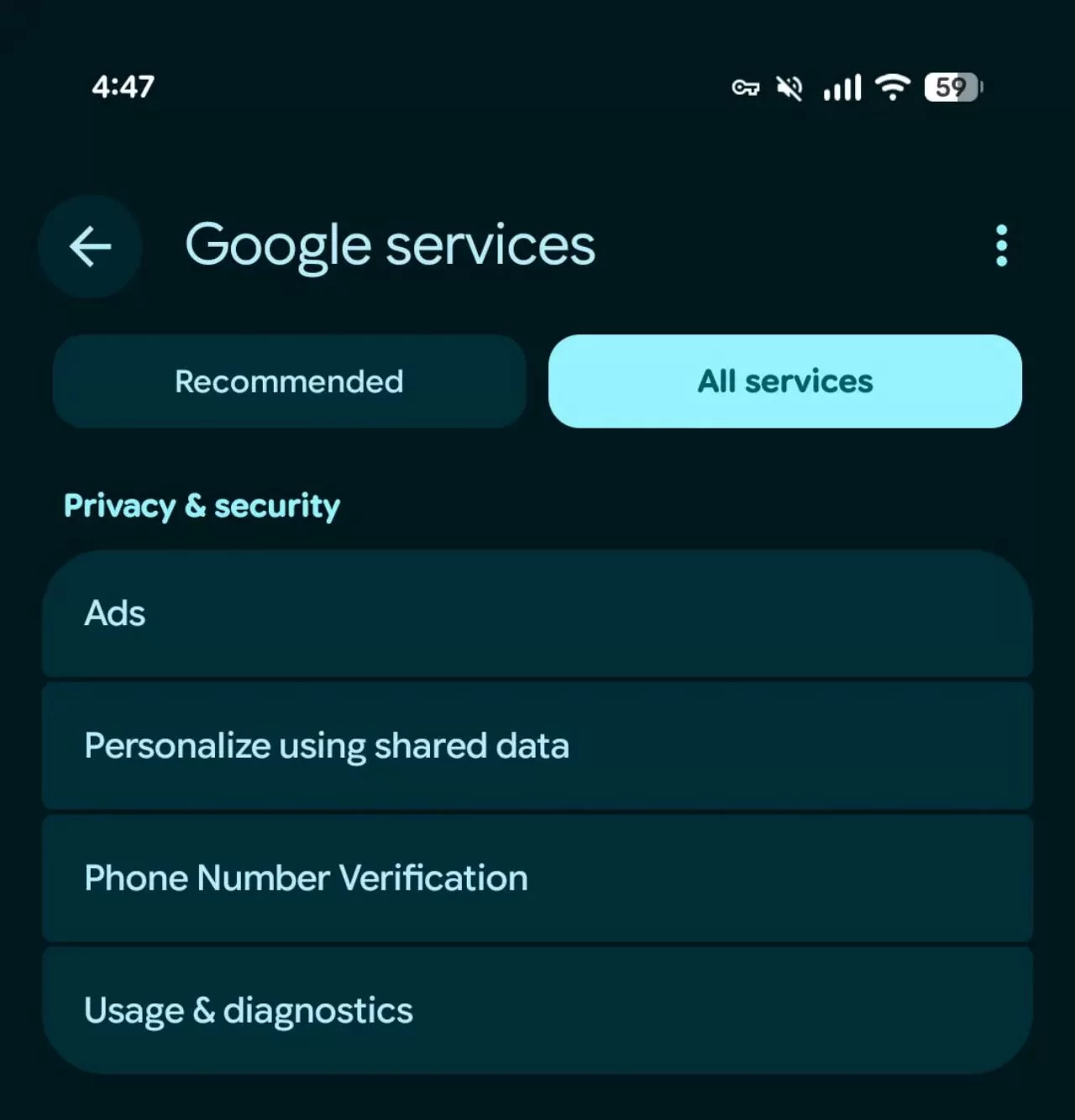
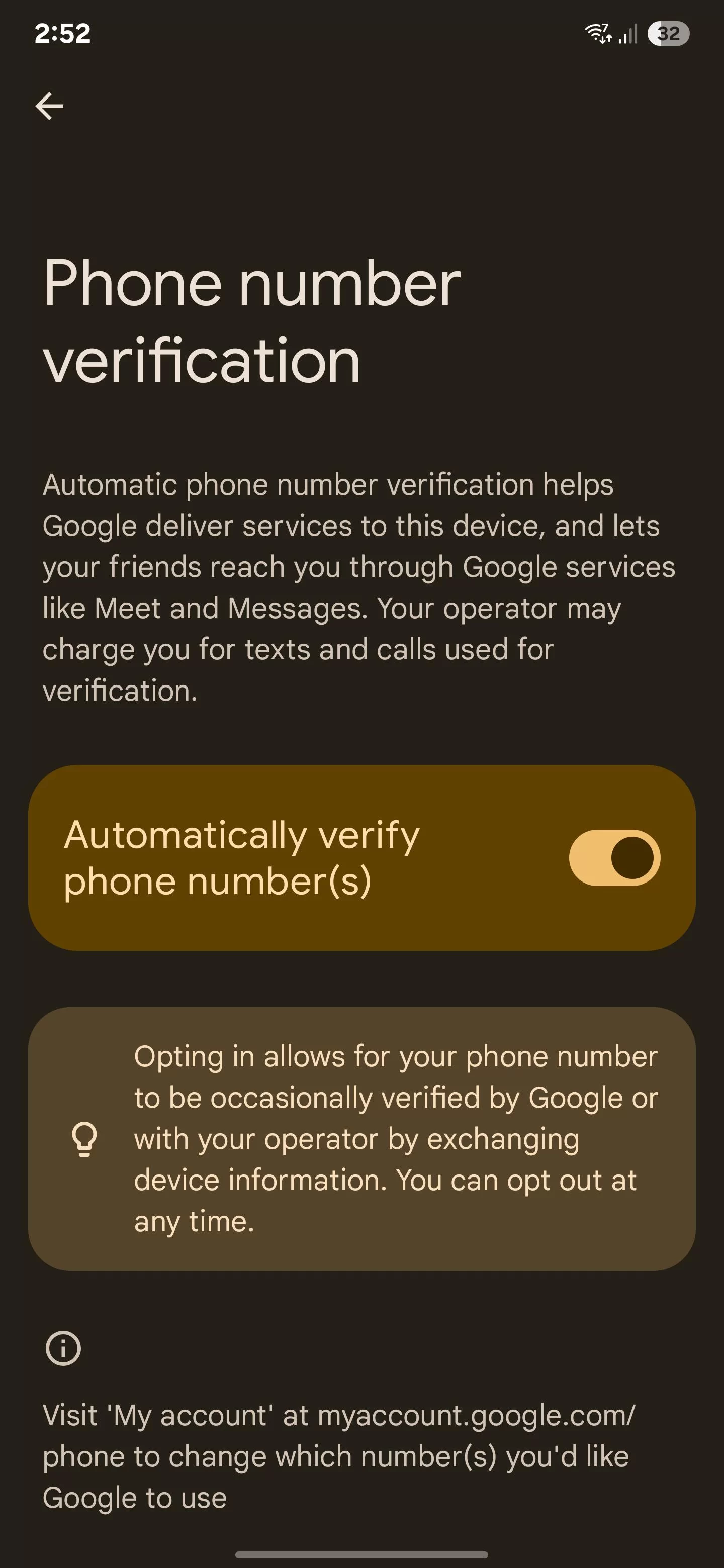
Follow these steps:
Some Android devices organize Google settings differently, and certain features may not be available on every device or software version.
Try these alternatives:
https://myaccount.google.com/phone Manage your Google Account phone numbers
Important: Disabling automatic phone number verification doesn't automatically remove phone numbers already saved in your Google Account.
It also doesn't disable every other phone verification process Google may require, such as verification during account creation or security checks.
1. Enable 2-Step Verification
Add another layer of security to your Google Account.
You can use a passkey, security key, or another supported verification method.
Visit:
https://myaccount.google.com/security Google Account Security
2. Review Your Recovery Information
Check the recovery phone number and recovery email associated with your Google Account.
Make sure both belong to you and are up to date.
3. Never Share Verification Codes
Never give your Google verification codes to another person, even if they claim to work for Google Support.
A verification code can potentially be used to gain unauthorized access to your account.
4. Review the Google Accounts on Your Phone
If you have several Gmail accounts on the same Android device, regularly check which accounts are signed in.
Remove accounts you no longer use or don't recognize, and review their security settings individually.
You should review each account's phone number settings separately.
2-Step Verification is a separate security feature that adds another verification step when signing in to your Google Account.
Take a minute to review your Android Google settings, check the phone numbers associated with your accounts, and make sure your recovery information is correct.
💬 Have you found the Phone number verification option on your Android phone?
Share your phone model and Android version in the comments. Your experience might help other users locate the same setting on their devices.
This can happen because Google offers an automatic phone number verification feature on supported Android devices. It helps Google confirm the phone number associated with your device without requiring you to type it every time.
But how does this feature work? Does it automatically connect your phone number to your Google accounts? And can you disable it?
Here's what you should know and how to take control of the setting.
📱 What Is Google Automatic Phone Number Verification?
Google Automatic Phone Number Verification is a feature that helps Google verify the phone number associated with your Android device.On supported devices, Google may use this feature to confirm your number and make it available for certain Google services, depending on your account and device settings.
This can make processes such as phone number verification and account setup more convenient.
Here's the important part: You may not always need to enter your phone number manually for Google to verify it.
However, this doesn't mean every new Gmail account automatically receives your phone number. The behavior depends on the device, available Google services, and applicable account settings.
🔍 Why Did Google Verify My Phone Number Automatically?
If you received a notification about automatic phone number verification after adding a Google account, it may be related to the phone number verification feature available through Google services on your Android device.Google can use supported verification methods to confirm that a phone number belongs to your device.
Depending on the verification process, this may involve exchanging information with your mobile carrier.
A few things are worth understanding:
- Automatic verification is not available in exactly the same way on every Android device.
- Verification behavior can depend on your Google account and device configuration.
- A verified phone number does not necessarily mean it has been added as a recovery number to every Gmail account on your phone.
- Verification may involve SMS messages, and carrier charges may apply.
🔐 Is Automatic Phone Number Verification a Privacy Risk?
Automatic phone number verification is a legitimate Google feature designed to simplify verification and support certain Google services.Its presence alone doesn't indicate that your phone has been hacked or that someone has accessed your Gmail account.
However, your phone number is personal information, so understanding which Google services use it is important.
For example, you might prefer to keep your personal and work Google accounts separate or limit how your number is associated with different services.
The good news: Google provides settings that let you review and manage automatic phone number verification on supported Android devices.
⚙️ How to Turn Off Automatic Phone Number Verification on Android
If you don't want Google to use automatic phone number verification, you can check whether the feature is enabled on your device.Follow these steps:
- Open the Settings app on your Android phone.
- Scroll down and select Google.
- Tap All services, if this option appears.
- Look for Phone number verification.
- Open the option to review the available settings.
- If an automatic verification toggle is available, turn it off.
What If You Can't Find the Phone Number Verification Setting?
Don't worry if the option isn't visible on your phone.Some Android devices organize Google settings differently, and certain features may not be available on every device or software version.
Try these alternatives:
- Use the search bar in your phone's Settings app and search for Phone number verification.
- Check the available options under Google services.
- Make sure Google Play services is up to date.
- Review your Google Account settings separately to see which phone numbers are associated with your account.
https://myaccount.google.com/phone Manage your Google Account phone numbers
Important: Disabling automatic phone number verification doesn't automatically remove phone numbers already saved in your Google Account.
It also doesn't disable every other phone verification process Google may require, such as verification during account creation or security checks.
🛡️ Four Ways to Keep Your Google Account Secure
Whether you leave automatic phone number verification enabled or turn it off, there are a few simple steps you should take to protect your Gmail account.1. Enable 2-Step Verification
Add another layer of security to your Google Account.
You can use a passkey, security key, or another supported verification method.
Visit:
https://myaccount.google.com/security Google Account Security
2. Review Your Recovery Information
Check the recovery phone number and recovery email associated with your Google Account.
Make sure both belong to you and are up to date.
3. Never Share Verification Codes
Never give your Google verification codes to another person, even if they claim to work for Google Support.
A verification code can potentially be used to gain unauthorized access to your account.
4. Review the Google Accounts on Your Phone
If you have several Gmail accounts on the same Android device, regularly check which accounts are signed in.
Remove accounts you no longer use or don't recognize, and review their security settings individually.
❓ Frequently Asked Questions
----------------------Can Google verify my phone number without me entering it?
Yes. On supported Android devices, Google can automatically verify the phone number associated with your device, depending on your settings and the verification method available.Does Google automatically add my number to every Gmail account?
Not necessarily. Automatic phone number verification doesn't mean your number is automatically registered as a recovery number for every Google account on your device.You should review each account's phone number settings separately.
Will turning off automatic verification affect Gmail?
Disabling this feature does not prevent you from using Gmail normally. However, Google may still request phone number verification for certain account-related or security processes.Is automatic phone number verification the same as 2-Step Verification?
No. Automatic phone number verification helps Google confirm a phone number associated with your device.2-Step Verification is a separate security feature that adds another verification step when signing in to your Google Account.
Final Thoughts
Google's automatic phone number verification can make account setup and verification more convenient, but it's worth understanding how the feature works and whether you want it enabled.Take a minute to review your Android Google settings, check the phone numbers associated with your accounts, and make sure your recovery information is correct.
💬 Have you found the Phone number verification option on your Android phone?
Share your phone model and Android version in the comments. Your experience might help other users locate the same setting on their devices.