
- by x32x01 ||

Sometimes, a feature that is completely hidden from the user interface is still accessible through the backend API. This can lead to serious security vulnerabilities, especially when the server fails to enforce proper authorization checks.
Here are two real-world vulnerability discoveries that started with a little API reconnaissance and ended with both reports being upgraded to P2 (High Priority).
After exploring the application and understanding how its features worked, I decided to start reconnaissance by collecting and analyzing its JavaScript files.
There were quite a few files, so instead of reviewing everything manually, I used GLM to analyze them and look for:
That gave me a much better understanding of the application's API structure.
I first tested it using an organization ID associated with my account. The response was empty.
Then I noticed something interesting: the endpoint accepted an organization ID that wasn't associated with my account.
During authorized testing, I checked the response and discovered that it returned organization information that shouldn't have been accessible to my user.
The response included:
It wasn't.
The application was hiding this functionality from the interface, but the backend API wasn't enforcing the same access restrictions.
However, after submitting the report, the triage team upgraded it to P2 and assigned it to the internal team as a duplicate.
Why?
Because the exposed information included personally identifiable information (PII), which significantly increased the impact of the vulnerability.
I remembered an important lesson:
If a developer overlooks an authorization check in one feature, similar mistakes may exist elsewhere.
So I started looking for functionality that was restricted in the UI but might still be accessible through the API.
This looked like an important business rule.
Instead of assuming the restriction was properly implemented, I investigated the application's API endpoints to find the employee creation functionality.
I used GLM again to analyze the available API endpoints and identify the relevant request.
It found:
The endpoint appeared to accept an employee name in the request body:
During authorized testing with an unverified Manager account, I confirmed that the API accepted the operation and created the employee despite the verification requirement.
In other words, the UI enforced the restriction, but the backend API did not.
However, the triage team upgraded it to P2 and assigned it to the internal team as a duplicate.
This confirmed that the issue had a higher security impact than I initially expected.
Here are a few lessons worth remembering during API reconnaissance:
Don't limit your security testing to what the UI allows you to do. Investigate what the backend API actually allows you to do.
A feature might be hidden, disabled, or restricted in the frontend, while the corresponding API endpoint remains accessible without proper authorization.
And sometimes, a few minutes of JavaScript analysis and API reconnaissance can reveal vulnerabilities that would otherwise go unnoticed.
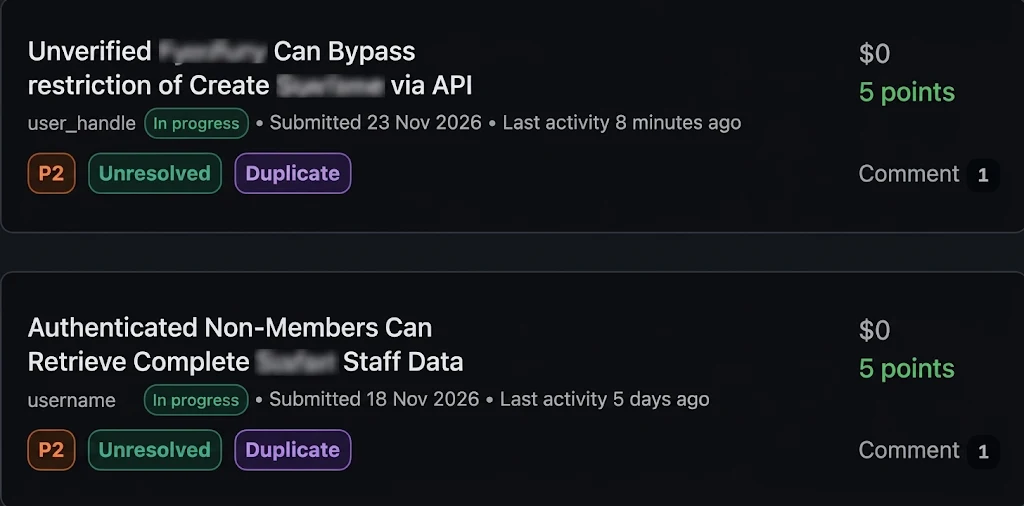
Here are two real-world vulnerability discoveries that started with a little API reconnaissance and ended with both reports being upgraded to P2 (High Priority).
🏢 Vulnerability #1: Unauthorized Organization Data Exposure (BOLA/IDOR)
Imagine an application that works like a large company with three types of users:- Admin: Manages the entire organization.
- Manager: Manages employees and teams.
- Employee: Has regular access to the workspace.
After exploring the application and understanding how its features worked, I decided to start reconnaissance by collecting and analyzing its JavaScript files.
There were quite a few files, so instead of reviewing everything manually, I used GLM to analyze them and look for:
- API endpoints.
- Hardcoded API keys or credentials.
- Exposed secrets.
- Interesting backend functionality.
That gave me a much better understanding of the application's API structure.
🔎 Finding the Hidden Endpoint
While comparing the extracted endpoints with the requests I had observed during normal application usage, I noticed an interesting endpoint I hadn't seen before:GET /api/org/{org_id}/employeeI first tested it using an organization ID associated with my account. The response was empty.
Then I noticed something interesting: the endpoint accepted an organization ID that wasn't associated with my account.
During authorized testing, I checked the response and discovered that it returned organization information that shouldn't have been accessible to my user.
The response included:
- Organization ID and domain.
- Organization address.
- Employee names and IDs.
- Employee roles.
- Other organization-related information.
It wasn't.
The application was hiding this functionality from the interface, but the backend API wasn't enforcing the same access restrictions.
This is a classic example of Broken Object Level Authorization (BOLA), also commonly associated with IDOR vulnerabilities.The security issue: The server failed to verify whether the authenticated user was authorized to access the requested organization.
📋 Reporting the Vulnerability
I reviewed the program's vulnerability disclosure policy and initially expected this issue to receive a lower severity rating.However, after submitting the report, the triage team upgraded it to P2 and assigned it to the internal team as a duplicate.
Why?
Because the exposed information included personally identifiable information (PII), which significantly increased the impact of the vulnerability.
⚙️ Vulnerability #2: Unauthorized Employee Creation
After discovering the first issue, I went back to exploring the application.I remembered an important lesson:
If a developer overlooks an authorization check in one feature, similar mistakes may exist elsewhere.
So I started looking for functionality that was restricted in the UI but might still be accessible through the API.
🔎 Finding a Missing Authorization Check
I discovered that a Manager account couldn't add employees to an organization unless the organization owner had verified that manager's account.This looked like an important business rule.
Instead of assuming the restriction was properly implemented, I investigated the application's API endpoints to find the employee creation functionality.
I used GLM again to analyze the available API endpoints and identify the relevant request.
It found:
POST /api/org/{org_id}/employeeThe endpoint appeared to accept an employee name in the request body:
JSON:
{
"name": "Test Employee"
}In other words, the UI enforced the restriction, but the backend API did not.
This is another example of Broken Access Control, specifically a server-side authorization and business logic enforcement failure.The security issue: The server failed to enforce the required verification rule when processing employee creation requests.
📋 Reporting the Second Vulnerability
I initially submitted this issue as P3.However, the triage team upgraded it to P2 and assigned it to the internal team as a duplicate.
This confirmed that the issue had a higher security impact than I initially expected.
💡 Key Lessons From These Discoveries
Both vulnerabilities highlight an important point: hiding a feature in the UI doesn't make it secure.Here are a few lessons worth remembering during API reconnaissance:
- 🔍 Analyze JavaScript files: They can reveal API endpoints and functionality that isn't immediately visible in the interface.
- 🔗 Map the API structure: Understanding how endpoints interact can help identify overlooked authorization checks.
- 🔐 Never trust the UI: Every sensitive operation must have proper authorization checks on the server.
- 🏢 Test object-level permissions: Verify that users can only access organizations and resources they're authorized to access.
- ⚙️ Check business logic restrictions: Account verification, user roles, and permission requirements must be enforced by the backend.
- 📋 Read the bug bounty policy: Data exposure, especially PII, can significantly affect vulnerability severity.
🎯 Final Thoughts
The biggest takeaway from these findings is simple:Don't limit your security testing to what the UI allows you to do. Investigate what the backend API actually allows you to do.
A feature might be hidden, disabled, or restricted in the frontend, while the corresponding API endpoint remains accessible without proper authorization.
And sometimes, a few minutes of JavaScript analysis and API reconnaissance can reveal vulnerabilities that would otherwise go unnoticed.
Last edited: